Introduction to the Hidden Advantage of Cursor.ai in Test Automation

Monika Dorula
Sep 22, 2025・10 min read
I am QA tester with over 5 years of experience in the IT industry. During this time, I have worked on a wide range of projects – from small, agile teams to large-scale systems for clients across different sectors. This has given me a broad perspective on software development processes and various approaches to quality assurance. Recently, I have been focusing more on test automation, which not only helps increase efficiency but also deepens my understanding of the technical aspects of the systems I work with. The more I explore automation, the more I am convinced that it’s not just about writing code. The real challenge is keeping the project consistent, readable, and scalable. That’s why I often rely on the Page Object Pattern (POP), which organizes the repository into pages, components, and tests.
Up until recently, traditional AI editors like Gemini in VS Code helped me only within a single file. That meant manually copying code fragments, writing imports, adjusting names, and making sure everything stayed stylistically consistent. Honestly, it was time-consuming and prone to errors.
Cursor.ai takes a completely different approach. It works in the context of the entire repository, understands dependencies between files, and allows me to develop projects faster, more consistently, and without tedious repetitive work. Cursor.ai is helping developers by providing AI features that assist both developers and non-developers in writing code, launching prototypes, and automating testing processes. Its AI features make it easier to write code and automate tasks, accelerating development workflows and supporting users throughout the software development process.
Why Cursor.ai Makes a Difference
1. Full Repository Context
The biggest advantage of Cursor.ai for me is that it knows the whole project, not just a single file. It understands the directory structure, classes, methods, and coding conventions – in my case, typical for POP.
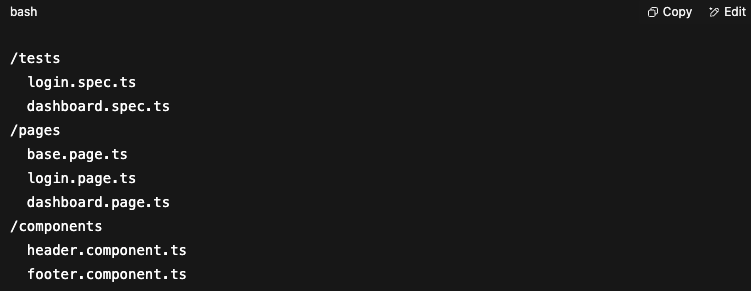
For example, I wanted to extend LoginPage with 2FA support. In a standard AI editor, I would have to manually point to the files, write imports, and make sure the new method looked consistent with the rest. In Cursor, all I had to do was start writing the method – it filled in the rest for me, matching the style to existing locators.
Example in Playwright/TypeScript:
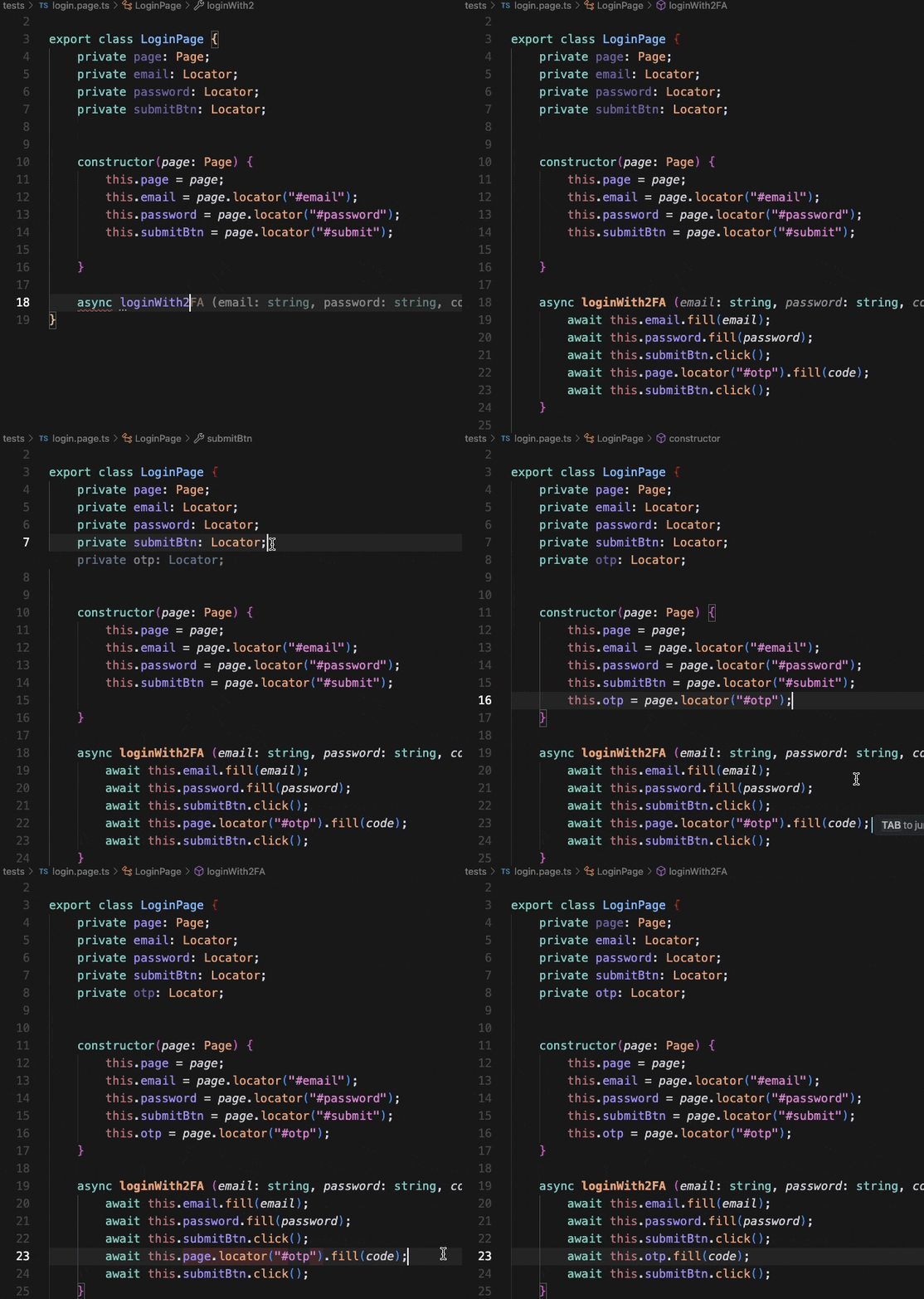
When I start writing a method, the code editor in Cursor.ai leverages natural language prompts and plain language, allowing users to describe desired functionalities and receive accurate suggestions tailored to the repository context. It predicts the entire method according to the repository context and also detects that the otp field should be included at this point. Correcting it to match the full repository context takes just three clicks – by clicking on the class and constructor, Cursor automatically adds the locator line following the POP convention and adjusts the code in the method accordingly. The whole process is fast, smooth, and very efficient.
Scenario: testing user login with 2FA.
Cursor.ai 
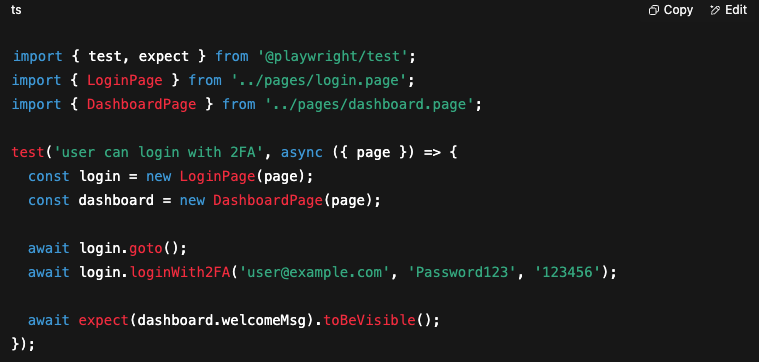
Cursor.ai immediately recognized that I had LoginPage and DashboardPage. It suggested the loginWith2FA method, took care of the imports, and the whole test perfectly fit my POP structure. Cursor.ai is supported by a variety of AI models, including third party models, which enhances its flexibility and adaptability to different project needs.
Gemini 
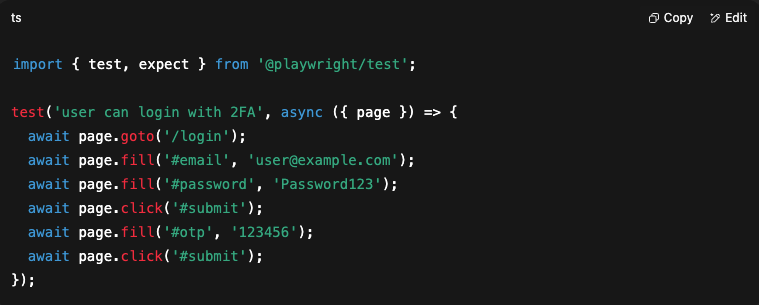
Gemini, on the other hand, generated a working test, but… without any reference to the repository’s structure. Everything was raw selectors, no classes or methods. That would mean manual rework and refactoring.
Many developers, especially those who are used to robust code editors that support multiple programming languages and integrate with other tools, may find Gemini less complete or powerful in comparison.
The difference in both time and quality was massive.
| Feature | Cursor | Gemini |
|---|---|---|
| Repository context | ✅ full | ❌ none |
| POP suggestions | ✅ automatic | ⚠ manual |
| Test writing speed | ✅ seconds | ⚠ minutes |
| Refactoring | ✅ Magic Tab + Fast Edits | ❌ none |
2. Magic Tab + Fast Edits in Practice
The biggest revolution I felt was during multi-file refactoring. For example, when I needed to add a logout() method across several places, I used to do it manually.
Cursor did it for me: Magic Tab suggested where the new method should go, and Fast Edits applied the changes across multiple files with a single click. These features automate repetitive changes, significantly boosting developer productivity and reducing the risk of inadvertently affecting other features during refactoring. Time savings? Huge.
Magic Tab and Fast Edits in Practice – Multi-file POP Refactoring
In POP projects, you often need to modify multiple files simultaneously, e.g., when adding a shared feature across pages.
In traditional AI editors, this is manual work in each file. Cursor, with Magic Tab and Fast Edits, handles it automatically:
- Magic Tab suggests where the new method should be used.
- Fast Edits applies changes across multiple files with one click.
Integration with existing extensions further streamlines the refactoring process and enhances compatibility with diverse development environments, making it easier for developers to work efficiently across various programming languages and frameworks.
Example: Adding a logout() method
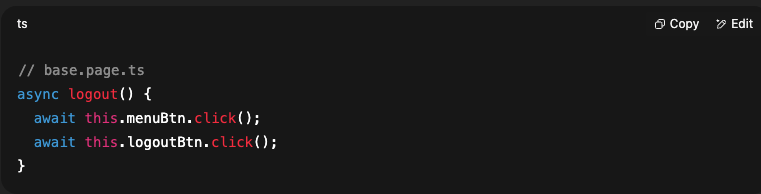
Cursor automatically suggests:
- In dashboard.page.ts → await this.logout();
- In login.spec.ts → refactor setup/teardown to use logout()
- In components → consistent invocations
When clicking on the line, Cursor.ai highlights it, and after pressing Tab, it applies the suggested change.

Additionally, if we want to apply the change across multiple files, we can write a command for that. Cursor.ai will then scan the entire repository, make the necessary changes where needed, and simply ask us for confirmation. Cursor.ai can also assist in generating commit messages for these code changes, streamlining version control workflows by providing quick, descriptive summaries of modifications.
| Feature | Cursor | Gemini |
|---|---|---|
| Repository analysis | ✅ full context | ❌ single file |
| Magic Tab | ✅ suggests changes | ❌ none |
| Fast Edits | ✅ multi-file updates | ❌ manual |
| Speed | ✅ instant | ⚠ slower |
3. Running and Diagnosing Tests in Cursor.ai
Beyond generating code, Cursor also supports running tests and diagnosing issues.
Traditionally, QA would have to:
- switch to the terminal,
- manually run npx playwright test,
- read error logs,
- return to the editor, find the cause, and fix the code.
With Cursor.ai, the process is integrated and streamlines software testing by providing AI assistance for rapid issue resolution.
- Run tests directly in the editor – you can execute the entire suite or just a single scenario. Note that large codebases can sometimes lead to performance issues during test runs, but Cursor.ai helps mitigate these slowdowns.
- Analyze test results – errors are displayed in context (e.g., which locator was not found). Cursor.ai also helps identify false positives in automated test results, reducing debugging time and improving accuracy.
- Suggested fixes – Cursor not only shows the stack trace but proposes possible solutions, e.g., “Element #otp not found, did you mean this.otpField?”
Privacy mode controls data sharing with remote servers and external services, protecting proprietary projects and sensitive data. However, enabling privacy mode involves trade-offs, such as limiting access to some powerful features that rely on external AI models. When using advanced AI features or third-party integrations, consider the cost implications, as external services may introduce additional operational expenses.
Example
Test Failed: login.spec.ts → user can log in with 2FA
LocatorNotFoundError: Unable to find element #otp
Cursor automatically diagnoses:
Suggestion:
Should you use this.otpField instead of #otp?
Update loginWith2FA in login.page.ts?
You can accept the change and re-run the test with a single click.
In practice, this closes the QA loop in one place:
- Write the test (Cursor generates code according to the repo).
- Run it instantly in the editor.
- If something fails – Cursor immediately diagnoses and suggests fixes.
This feedback not only helps teams implement process improvements but also builds knowledge for future testing scenarios, making AI-assisted workflows more efficient and accurate.
Testing Best Practices
Testing is at the heart of successful software development, acting as the safeguard that ensures every release meets the company’s quality standards and user expectations. In today’s fast-paced development cycles, relying solely on manual testing can quickly become overwhelming and inefficient. That’s where automated testing and test automation come into play, allowing teams to streamline repetitive tasks, catch issues early, and focus their manual effort where it matters most.
A comprehensive approach to testing combines both manual and automated methods. Manual testing is invaluable for exploratory scenarios and user interface checks, but automated testing shines when it comes to running large suites of regression tests or verifying core features after every code change. By implementing test automation, teams can run tests more frequently, reduce the risk of human error, and ensure that new code doesn’t break existing functionality.
Regression testing is a key practice in maintaining software quality over time. Every time new features are added or changes are made, regression tests help confirm that previously tested parts of the system still work as expected. Automating these tests not only saves time but also increases confidence in the stability of the product.
Quality control is another essential aspect of the testing process. By setting clear quality requirements and using automated tools to enforce them, teams can catch defects early and prevent costly issues from reaching production. This proactive approach to quality assurance helps companies deliver reliable, high-performing software while keeping development costs and manual effort under control.
In summary, adopting best practices in testing—especially by integrating automated testing and regression testing into your workflow—boosts efficiency, supports quality control, and helps teams consistently deliver software that meets the highest standards.
My Summary
After a few weeks of working with it, I can confidently say that Cursor.ai  has changed the way I approach test automation.
- Thanks to full repository context, I don’t waste time on small details.
- Magic Tab lets me write consistent code in just seconds.
- Fast Edits makes refactoring easier, which used to be tedious and error-prone.
In practice, I’m saving hours of work, the project looks more professional, and it’s easier to maintain. Adopting Cursor.ai aligns with modern software development practices, helping the company streamline not only test automation but also other processes that impact overall efficiency. For me, Cursor.ai is a real step forward in test automation – and honestly, it’s hard to imagine going back to the old way of working.
How this article was made. Drafted with AI assistance, then fact-checked and edited by our team. Editorial responsibility: Startup Development House sp. z o.o. Read our AI content policy
Digital Transformation Strategy for Siemens Finance
Cloud-based platform for Siemens Financial Services in Poland


You may also like...

Software Engineering Service
Engineering is a discipline of measurable, repeatable practice, and that is what separates a service from simple contract coding. This guide sets out the pillars of high-performance software engineering: strategic discovery, architectural design, rigorous testing and lifecycle maintenance. It compares cooperation models, explains how to choose a technology stack that suits your constraints, and walks a project from ideation to scale. A closing section looks at how AI is reshaping engineering practice itself.

Alexander Stasiak
Aug 20, 2026・7 min read

How AI-Powered Testing Tools are Revolutionising QA/QC
AI-powered testing tools are transforming quality assurance and control with automation, efficiency, and accuracy. Explore their impact on QA/QC processes, popular tools, and future trends.

Marek Pałys
Dec 03, 2024・7 min read

Understanding Acceptance Criteria: A Simple Guide for Beginners
Acceptance criteria are essential for aligning project goals and ensuring quality deliverables. This guide explains their importance, best practices, and role in Agile development.
Alexander Stasiak
Dec 05, 2024・13 min read

Travel app QA testing
Travel app QA testing is essential for delivering seamless and secure user experiences. This guide covers the importance, key areas to test, challenges, best practices, and future trends in travel app QA testing, ensuring high-quality travel applications.

Marek Majdak
Feb 27, 2024・13 min read

Smart Mirrors in Retail: Enhancing Shopping Experiences with Technology
Smart mirrors are transforming retail stores by offering interactive shopping experiences, virtual try-ons, and personalized recommendations. With features like augmented reality and real-time inventory integration, these technologies enhance customer engagement and streamline the in-store experience.
Alexander Stasiak
May 14, 2024・9 min read

Business Intelligence Services & Solutions
Most organisations have more data than insight, and the gap is architectural rather than analytical. This guide explains how business intelligence services and solutions turn fragmented data into a strategic asset, and how modern BI differs from traditional reporting. It reviews industry-specific applications, provides a step-by-step implementation framework, and names the pitfalls that stall BI projects. The final sections cover AI-augmented analytics and how to future-proof a data strategy.
Alexander Stasiak
Jul 15, 2026・8 min read
Recently added

How Startup House Cut Leasing Applications to 2 Minutes for Siemens Financial Services
Leasing used to mean paperwork, manual credit checks, and decisions that waited for office hours. For Siemens Financial Services Poland, Startup House replaced that with SimplyLease Online: an application customers complete in about 2 minutes and an automated credit decision delivered in about 7, at any hour. This case study shows how the platform was built within Siemens Group security standards, how it connects to Siemens systems and external data providers, and what a partnership running since 2016 has delivered. It closes with three lessons that apply to almost any financing or lending product.
Alexander Stasiak
Oct 06, 2026・5 min read

How a Cybersecurity Platform Serving Fortune 500 Clients Cut Onboarding by 95% with an AI Agent Built by Startup House
A cyber risk platform trusted by Fortune 500 companies had a familiar problem: customers respected it but opened it once a quarter, and onboarding took 45 minutes of guided setup. Startup House built Aria, an AI agent embedded inside the product, with a four-layer interface that serves board members, CFOs, and CISOs in one panel. Onboarding dropped by 95% to under 2 minutes, data exploration became fully self-serve, and the platform turned into a daily decision-support tool. This case study explains the interface, the tenant-isolation architecture, and why none of it required touching the platform's core codebase.
Marek Pałys
Oct 05, 2026・5 min read

AI and Digital Projects by Startup House: 5 Measurable Outcomes in Numbers
Claims are easy in software development, so this article sticks to numbers. It walks through five outcomes from Startup House client projects, from a 95% cut in onboarding time with an embedded AI agent to a 40% reduction in development costs for Omnipack. Each section says what kind of work produced the number and links to the public case study behind it. The closing section names three patterns these projects share, worth borrowing whether or not you work with us.
Alexander Stasiak
Oct 04, 2026・5 min read

Healthtech Software Development at Startup House: Compliance-First Projects and Results
In healthcare software, compliance is either an architecture decision or a retrofit. This article shows what designing it in from day one looks like across three Startup House projects: a sales platform for Siemens Healthineers active in more than 60 countries, a dementia care MVP shaped by 7 user testing sessions with patients and caregivers, and Doogie, a HIPAA-grade AI showcase built in 2 months. It also explains how RAG keeps clinical AI answers traceable to verified sources, and why patient data is never used to train models. For MedTech companies and health SaaS platforms, it is a practical look at what compliance-first engineering means beyond the label.
Marek Pałys
Oct 03, 2026・5 min read

Edtech Development at Startup House: What We've Built and What It Changed
EdTech platforms fail for UX reasons more often than technical ones: learners drop off, content doesn't scale, and ROI stays invisible. This article shows how Startup House avoids that with phased delivery and real user testing, using two projects as proof. Graspify went from a bold idea to a microlearning platform that trained hundreds of employees during a corporate event, and LITTLEWINE got an investor-ready scope from 10 user interviews in 2 weeks. It also covers AI learning tools that answer only from approved content and can go live in as little as 2 weeks.
Alexander Stasiak
Oct 02, 2026・5 min read

AI in Fintech: Startup House Projects, Lessons, and Outcomes
Fintech customers expect consumer-grade speed, while regulators expect bank-grade control. This article shows how Startup House has handled that tension in three projects: automated 24/7 credit decisions for Siemens Financial Services, a cyber risk platform that grew revenue 150% in a year, and a climate fintech team for CHOOOSE assembled in 2 weeks. Each project comes with the lesson it taught us. The article closes with five rules for AI in finance, from grounding every answer in verified data to designing tenant isolation into the architecture.
Marek Pałys
Oct 01, 2026・5 min read
Ready to centralize your know-how with AI?
Start a new chapter in knowledge management—where the AI Assistant becomes the central pillar of your digital support experience.
Work with a team trusted by top-tier companies.


